Showing posts with label Lotto Checker. Show all posts

15 April 2012

10,000 lotto checker downloads!

Today at some point my lotto checker app will have surpassed 10,000 downloads and to mark this event I'm working on an update. There's a number of things that I'm going to update, the first of which is that I'm now going to include ads in the app. I'm going to keep these small and they're going to only be on the results display page.

The second update is the ability to search for historic results. I'm changing this to appear with in a tabbed view in the app and it will work by posting data to the lottos website and parsing the HTML returned, or possibly displaying this with in some kind of browser view

For now I'm battling the API version problem with the latest google adSense jar. It seems it requires the SDK version 13 of android before it will display test ads.

18 January 2012

Google Analytics data

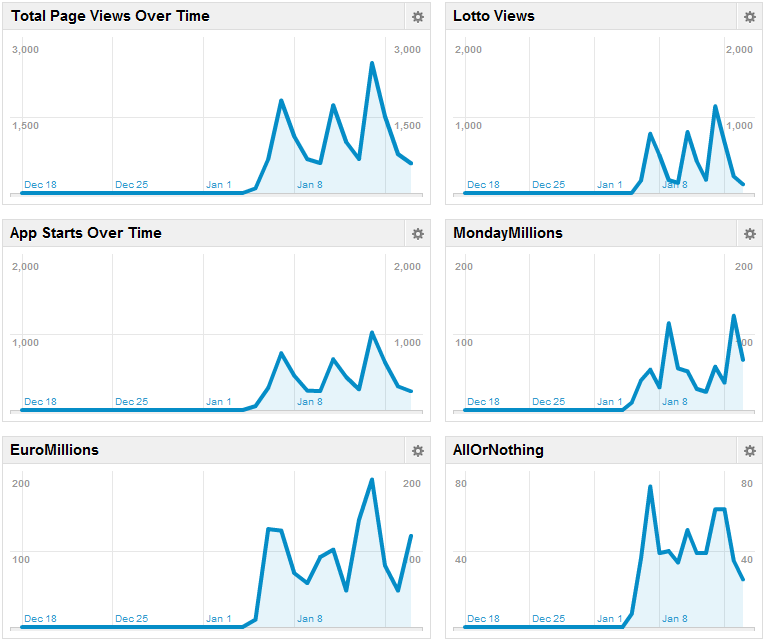
As I mentioned earlier, here's the latest google analytics data over the period that I've been logging.

The above image shows a figure for the total number of hits tracked for each page or screen in the app that a user can look at. Although there are only a number of activities or screens that are re-used in the app implementation, when ever the data for a different game type it is tracked as if it were a separate page on a website.

The above chart shows the game results look up relative to each other game type. Lotto is a clear dominator.

These graphs plot the number of page tracks over time which is interesting, as a clear trend of when people actually use the app can be seen. If you note that the graph spike on Wednesdays and Saturdays for the Irish lotto. EuroMillions turns up on Fridays, however interestingly people checked Euro Millions results more on Saturday. The number of people visiting each page actually reflects pretty I think on how many people play each game from my experience selling lotto in my previous retail job.

The last image is the live tracking section of google analytics. This is the most I've witnessed people using my app at a single point in time, although it's entirely possible that there have been more people using it at once and I just hadn't seen it. It's interesting watching as individual clicks on pages scroll across the screen in real time. Obviously it's better to see in video format than a still image, as the interface is animated.

9 January 2012

Lotto Checker stats, now with analytics results!

It's been an interesting few days with the inclusion of google analytics, however downloads is quickly approaching the 5000 marks, and with the inclusion of google analytics I now have a better idea of how people are using the app. The first day I updated my app to include analytics I saw that on Saturday 746 people started my app, with 452 on Sunday. I updated the app on Friday, so I would imagine that a lot of these hits were due to people checking out the app to see if there was anything new. I will have to observe the numbers over a longer sample period to gauge the weekly trends. It will be interesting to see next weekend and on Wednesday if the trend matches this Weekends usage, as the Irish lotto games are on Wednesdays and Saturdays.

I'm also looking at the pages that people are viewing. There were a total number of 1872 pages tracked on Saturday night, 778 of which were Lotto. An interesting observation is that my app has had more page view tracks than this blog has had in the number of months I've been posting to it. There were quire a large number of Lotto checks on Sunday as well at 498, probably because people might have resorted to checking numbers the day after the draw.

One of the most interesting parts of google analytics is the way in which you can present the data. The live data tracker is also quite impressive, where you can witness page events being tracked in real time on a sliding graph. It also gives you insight in to how many users were on the app at any given time.

I'm going to get back developing my Driver Tools app this week and try and get some debugging done on the graph information. There are a number of other design features I would like to review also, however I can't think of them at the minute. I'll have an update later on in the week.

5 January 2012

Lotto Checker 1.5

I updated the lotto checker app today with the session class that I wrote for the Driver Tools app. It contained all the functionality for tracking the activities a user will start in my app. In the lotto checker app, I track when the app is started up, and when ever a user displays the results for a game, that is also tracked. This will help me in deciding on what an how I use analytics in the Driver tools app, and it will give me a better idea of how used my lotto checker app is, so that I can improve different aspects of it in the future.

The total number of downloads for my Lotto Checker app now stands at 4,373 total installs (users) and 3,028 net installs (devices).

11 November 2011

First week in new job!

Last Monday I started a new job with Realex Payments as an Integration and Support Analyst. It has been an exciting week becoming familiar with my new role in the company, but unfortunately I hadn't had much time to work on my android projects lately. My weekday consists of an early start out in Monkstown which involves an hour of sitting in traffic every morning. After work after about another hour of sitting in traffic I battle falling asleep on the couch at home, so I'm usually too tired to work on projects in the evening. I do however have weekends off which is new to me, because of my previous job. I plan to make full use of this perk and get some solid development time in on the weekends that I now have off.

This weekend I'm planning on getting the back end of the app set up with a few classes for storing information about different things. I'll do a bit of reading tonight so that I'll be ready to get stuck in tomorrow and hopefully I'll have something worth adding to the project by tomorrow night.

Also, a quick stats update for the lotto checker app. I'm currently at 1859 installs and 1461 active installs. This is a 78.59% success rate with users, and my impression would be that a lot of UK users probably download my app due to the fact that it is featured in the top 30 in the productivity section of the android market with out realising that it is targeted at Irish users for Irish lotto results. I'll have a look at the UK lotto website and see if that may be something to incorporate in to the next iteration of that project.

4 November 2011

Driver Tools

I've decided to get back in action developing apps with a brand new app. The reason I'm starting on a new app while I'm still testing and publishing updates for my last app is because I'm starting a new job on Monday which involves driving across town quite a distance every morning and then back again in the evening. I want to develop a driver tools app which will log fuel economy over time and it will contain a bunch of other tools for a driver to be able to adapt their driving style for a more economic drive. I feel this tool will be useful to me in the upcoming weeks as I drive to work.

Some of the things I would like the app to feature are graphing of fuel economy over time, tire pressure calculators and wheel size stats, route tracker which compares different routes on fuel economy and individual car profiles. This will mean that I'll be using APIs such as the GPS API and the databases API which is a side to android I have not yet used.

I've got an idea for the user interface design. I'm going to tab each of the functionality activities in tabs which I'm using this tutorial for. The methodology I'm going to approach this project with will be heavily orientated around good user interface design, robustness and security. I am also going to create two versions of this app, one of which will be free with ads the other will contain a bit more functionality and will not contain ads. I'll divided up the functionality and decide on how much I'll release for free once I've I'm in beta testing and I think I might release a beta on the market and update it until it is at an acceptable level of functionality to release a premium version.

In other news, my lotto checker app surpassed 1280 installs with just over 1000 active users today.

22 October 2011

Update published.

I solved a number of issues with the ticket checker and I am now glad to say that I have just published an update to the android market that will allow a user to check their Lotto or Monday Millions numbers to see how many matches they have. There is still an issue with the ticket checker for the Euro Millions draw which will I'll test for over the rest of the weekend, and I haven't even begun to test for the All or Nothing draw which I have a feeling will work pretty flawlessly on the methods already implemented for checking the lotto and Monday Millions to be honest. I'm not sure how long the app market takes to update or when it will be ready for downloading, but it has been uploaded and activated so it shouldn't be too long.

Testing latest update.

I'm currently testing an update for my lotto checker to allow users to check against the Irish lotto results and maybe the Monday millions only. This is because the Monday millions and lotto share the same format and any tests performed on the ticket checker component can be tested for both games. I need to fully test for the other games, euro millions being more tricky because of the number of bonus numbers but hopefully I'll have it updated soon enough. I want to get the update on the market tonight if possible, in time for tomorrows Lotto game. I think I have it at a state at the minute where the ticket checker can't crash, and I haven't encountered a scenario yet where the number of matching numbers is wrong.

I discovered today that my app is ranked 23 on the list of free apps in the productivity category which may be why the number of downloads is shooting up. I currently have 400 installs with 325 active installs which is an 81.25% success rate. Hopefully this update will bring more users but due to the fact that I'm now publishing to 325 or more people I want to make sure the update will not dilute the quality of the app in its current state.

19 October 2011

New update soon.

I've been updating my ticket checker class today and I'm ironing out the bugs, but the update should be ready to upload tonight. I think it's important to get a further update and some of the lotto checker functionality in as soon as possible. Currently I've removed the functionality for telling the user how much they have won because testing for that will take about three or four days in my best estimation.

In other news I sat a phone interview last week for a software integration consultant role with a company. Out of that phone interview I managed to get an personal interview which I sat last Monday, and out of that interview I managed to get a job, so things are looking up. This blog was originally set up to help me get a job, but since I'm actually enjoying updating my apps and I've actually warmed up to posting development updates here I'll be continuing this blog, even though traffic is slightly lacking. I'm currently getting more app downloads per week than I am hits to this blog. The current number of downloads of my app is 261.

16 October 2011

Back in to action with the lotto ticket checker.

Over the last two days I've started back working on the interface for allowing a user to enter in lines on their ticket to be checked against the latest results. So far the functionality exists where a row of EditText boxes are dynamically added to a linear layout along with a button which reads "Add Line". When the user clicks the button, it runs through each of the text boxes first making sure that the input is valid, then checking that the input is not a replication of an entry in one of the previous text boxes. After checking for each of these conditions on each edit box, if they meet the criteria they are appended to an array in a specific format that can be used to check against the results in the results class. A text view is updated with this line to show that the user has entered a line in for checking. If a user wants to add another line to be checked, the new line will also be checked against the existing lines in the text view.

I've started using the Toast class for displaying messages when a user tries to input data that is doesn't meet the described conditions (i.e. numbers) which actually reminds me of something I had forgotten. I currently don't have something to ensure that numbers entered are above 0 and below what ever the highest number that can be picked for each game is. I'll get back on that tomorrow.

Other updates include the addition of a Stats class which is used for storing information about winnings. The functionality for parsing the winnings table from the accessible results has also been added. The winnings table displays information about the number of winners of each winning combination of numbers, the number of Irish jack pot winners, and how much each winning combination has won. In the Stats class it keeps a linked list of Stat objects which stores a row of the winnings table. I'm thinking it might be a better idea to store it in a HashMap instead, because then if I pass a Stats object through the lotto checker activity I can get specific Stat objects using based on how many numbers the user has matched as a key. This should make displaying how much the user has won quite a great deal easier.

12 October 2011

Multi-component list adapters.

I've decided to work on making my GUI look better so I set up a test project with the express purpose of messing about with different layouts whilst trying to comply with best practices for GUI efficiency as described in the android reference documents. The GUI looks as follows.

Each list item contains an ImageView on the left which is an anchor for a TextView to it's right, which in turn is an anchor for the TextView title which is above. There is no problem displaying this purely in a RelativeLayout, however when it comes to adding this kind of layout to a ListActivity I seem to be running in to trouble. I'm only able to set the text in one of the two boxes. I think the answer lies with creating a custom Adapter class for seeding the ListView.

10 October 2011

Android market

A basic version of the lotto checker app should now be live on the android market.

8 October 2011

Review of results class

Tomorrow I'll be up at 5 for the Japanese grand prix qualifier and the Irish rugby match against Wales and after I'm going to review my Results class. I think maybe the class should be an abstract class with an implementation of the checking method. Then I can write a subclass of the Result class for each type of game. I think it would be a more logical structure to the app and it should make the addition of new game types easier. Also, maybe the functionality for pulling the information from the web should be a method of each game type.

5 October 2011

Addition of a results class

Today I decided it would be best to add a class for storing and checking the results. This way all of the results for a game can be passed through with the intent for opening the ticket checker GUI. For this to be possible the Results class had to use the serializable interface. Contained in the Results class are methods for comparing a string of lotto results to the results contained with in the instance of the Results class. The method returns the number of matching numbers. This makes the implementation of the Ticket Checker GUI a lot more straight forward now since most of the functionality for comparing the numbers for each game type has now been implemented. All I need to do now is implement a way of entering in numbers and I can begin testing.

Once I'm finished testing, I'm toying with the idea of integrating some form of map functionality which will display all of the lotto retailers in Ireland so a user can find the nearest point to where he/she can cash their lotto ticket in. Of course I'll have to find a list of retailers first, but I don't think this will be too much work and it allows me to jump in to the geo location side of things which interests me.

4 October 2011

Entering in your ticket. Designing a GUI.

Today I by started by designing a system for entering in the numbers on your lotto ticket to check against the results but I'm finding it difficult to decide on what form of input and layout to use. I'm currently looking at using a number picker widget, however I'd have to write a new layout for each type of game. The number picker widget not only allows you to scroll through a list of numbers, but it allows you to enter numbers in to the box manually using the keyboard as input. The range of numbers can be restricted. This seems like a simple enough method of entering details of a lotto ticket, then based on which game type, a new layout can be loaded which has the details regarding how many numbers pickers will be required in a row. The following is an example of the number picker widget I'm looking at.

In other news, I've fixed a bunch of formatting issues with the lotto feed and I've implemented the algorithm for pulling the results for both the Euro Millions and All Or Nothing results, I did a bit of testing on a couple of different emulators and deployed the app on my archos. I decided to make the font double the size and it's now at an acceptable size for reading on both smart phones and tablets. I'm going to register a developer account and maybe upload it to the android market tomorrow for free. There's not a lot of content at the minute, because it only functions as a feed for the results, but if it gets approved I can update it with more functionality the next couple of days and weeks.

2 October 2011

Some small changes!

I've decided to change the entry point GUI so that instead of displaying two buttons for checking the latest results and older results. Instead you now get a ListView with all of the different lottery games. This solves a number of problems, the first being that I can remove the functionality of searching for older results from this iterations design specs. I can maybe integrate that functionality in at a later point. The second thing this change does is make the user interface look a lot better. The following is a screenshot of the new layout.

The third thing that these changes have affected is that now because the game type that the app is looking for the results of is being passed through with the intent, the app can stop trying to parse results from the lotto results webpage once it has found what it's looking for which makes the whole process quicker. It also means my code is more organised now because I've created a function to check for each individual game which gets called based on the game type. With this approach I can modify how it parses each type of game result. This is important because not every game has the same amount of numbers and the formatting changes slightly for each game. Only the Lotto and Monday Millions have the exact same formatting.

1 October 2011

Lotto results web page parser integrated!

It's been a long day of coding and I'm going to call it a night after I update this blog. I've got the formatting of the results all sorted out by splitting the strings on regular expressions. I've also integrated the web page parser in to the app now and I've sorted out the activity permissions so everything is working with in the emulator.

Next on the list of things to do is to thread the parsing of the results page so that the GUI will not freeze up. It doesn't currently freeze on the emulator, but because of the difference in hardware for mobile phones it may freeze on a slower device.

There are only a few components I need to implement before I start testing everything.

  • The Lotto checker activity
  • The List of previous results
  • Utilization of threads
  • Graphics update, making the app look pretty.

I'm going to have to brain storm about how I'm going to be able to pull off old results for the old results list. Unfortunately I won't be able to get them from the source I'm getting my current ones from which makes things a little bit more tricky. We'll see. I love Android.

Parsing lotto Results

I've decided to set up another eclipse project so that I can write the component for pulling the lotto results from the lotto website and get the formatting right and then swap it in to the android app at a later point. Hopefully the only thing I'll have to swap around is some of code for setting up the connection and maybe some of the error handling.

I'm now using a different results page which I believe is formatted in a way which should make it easier to grab all of the results at once. So far the code sets up a connection to the lotto web server and reads line by line each page, looking for a specific piece of html, at which point functions are called to parse each set of results from that line down. It's worked pretty well so far. I'm just messing about with the formatting of the text at the minute cleaning it up a little. So far it looks like the following.

Wednesday 28 September 2011
Result: 5 10 15 27 35 43 Bonus: l
Plus 1 Draw: 17 19 25 30 41 44 Bonus: 42
Plus 2 Draw: 12 15 32 35 41 44 Bonus: 24


It's having trouble with some of dates because of the way I've written how it looks for that segment of code, but it's not important for the minute. I'll come back to it.

Basic UI design.

I have most of the UI structured and sorted out at this point. There are three main user interfaces for this app. The first is the menu. The menu has a couple of buttons which when pressed create an intent and start up another activity. So far there are only two buttons, one of which will create an intent to start up a "ListActivity" displaying the previous lotto results. The second will create an intent to start up another result checking activity for displaying the latest results. This activity will can also be started by clicking on an item in the list activity for that set of results. On the result checking activity it will display the lotto numbers of that date and there will be a further button to enter your lotto numbers to check if you've won on that activity UI.


I'm currently working on the screen that displays the results, but it will probably be just a TextView with a button that leads to another UI for entering in your ticket or something. Once I'm done with that I'm going to look in to the best way of pulling the results from the web, because I don't think the full java.net package is available on android and I think you have to register network connectivity as a function in the manifest or something. I'll look in to it.